
Efficient and Cost Saving Law Firm Document Automation & Workflow Solutions
Legal processes can be complex and time consuming. We worked closely with legal counsel to transform extensive paperwork and complicated regulatory filing into an efficient online experience.
Reduced document processing time by up to 40% for a legal practice. A law firm seeking a streamlined approach to previously time-consuming paperwork and processing turned to MOST Programming for help.
Reducing Cost and Time of Manual Document Processing
Automating operational processes in the service industry can have significant rewards. Legal processes can be particularly complex and time-consuming, and streamlining those processes can reduce time and cut costs. The client hoped to transform extensive paperwork and a complicated regulatory filing process into a semi-automated process to improve efficiencies and enhance its customers’ online experience.
THE CHALLENGE
Created Online Platform Automating Bankruptcy Reporting
The MOST Programming team worked very closely with legal counsel to transform the previously tedious vetting and onboarding experience into a simple and accelerated process using advanced process automation and optimization.
THE SOLUTION
Streamlined Client Interactions and Process Efficiency
Ultimately, both the internal and customer-facing experience was enhanced. The automation permitted a smoother and more productive interaction between legal counsel and clients, and a more empowering process for all parties. The application reduced overall document processing time by up to 40% and was accessible by mobile phone, tablet, or desktop computer.
THE RESULT



Law Firm Document Automation Workflow Solutions: Streamline Legal Operations in 2026
Introduction
Law firm document automation workflow solutions have become essential infrastructure for legal practices seeking to eliminate bottlenecks and compete effectively in today’s market. These systems transform how law firms create documents, manage approvals, and maintain compliance across every practice area. AI integration in document automation now enables real-time risk analysis, clause suggestions, and data extraction, further streamlining legal workflows. Effective solutions combine dedicated automation platforms and features within practice management suites to reduce manual work and improve accuracy.
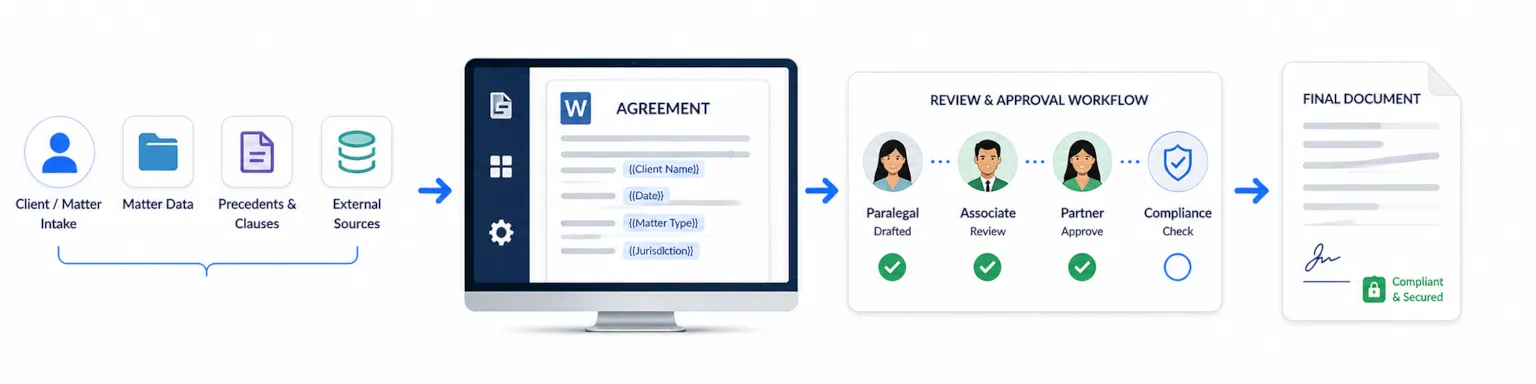
This guide covers automated document generation, document workflow automation, and integration solutions specifically designed for legal practices. It falls outside the scope of general office automation or consumer-grade template tools. The target audience includes law firm partners, legal operations managers, and IT decision-makers evaluating how to modernize their document processes while maintaining the precision legal work demands. Document automation tools are designed to streamline business processes in law firms, ensuring efficient document management, compliance, and security.
Direct answer: Law firm document automation workflow solutions integrate document templates, data sources, and approval processes to generate legal documents up to 10x faster while ensuring accuracy and regulatory compliance through intelligent document automation. These solutions help save time and reduce manual work by automating repetitive and time-consuming tasks.
By the end of this guide, you will understand:
- How to achieve time savings of 50-90% on repetitive document creation tasks
- Methods for reducing data entry errors and ensuring accurate documents
- Strategies for improving client satisfaction through faster turnaround
- Approaches to better compliance tracking and audit trails
- Pathways to building scalable operations that grow with your practice
- How to evaluate key features of document automation tools, such as integration, security, and ease of use
Key Terms and Definitions
Document Automation:
A systematic approach to creating, reviewing, and managing legal documents using technology rather than manual processes. Document automation helps standardize processes, save valuable time, increase efficiency, and reduce human error by following predefined rules and templates. It also creates a reliable audit trail, making it easier to track when a document was created, modified, or approved.
Workflow Automation:
The use of technology to automate the sequence of tasks, approvals, and document routing within a business process. Embedding approval steps into workflows improves accountability, speeds up decision-making, and eliminates repetitive manual work.
Template Libraries:
Centralized collections of reusable document templates, such as contracts, pleadings, and correspondence. These templates contain dynamic fields and conditional logic, allowing for automatic population with matter-specific data and ensuring consistent formatting and compliance. Standardized templates help avoid copy-paste mistakes and ensure consistent formatting.
Audit Trail:
A reliable, chronological record of all actions taken on a document, including creation, modification, approval, and access. Audit trails enhance compliance and auditability by making it easier to track when a document was created, modified, or approved, and by whom. This is crucial for regulatory compliance and internal governance.
Understanding Law Firm Document Automation Workflows
Document automation represents a systematic approach to creating, reviewing, and managing legal documents through technology rather than manual processes. For law firms, this technology addresses the fundamental challenge of producing high volumes of business documents while maintaining the precision and consistency that legal work requires.
The relevance to modern legal practice extends beyond simple efficiency. Firms implementing document workflow automation gain competitive advantage through faster client service, reduced overhead, and the ability to redirect attorney time from manual tasks to strategic legal work.
Document automation helps law firms streamline operations and standardize processes by using automated workflows, standardized templates, and procedural checklists, which reduces the need for human intervention. Automating document workflows also enhances compliance and auditability by creating a reliable audit trail for document creation and modifications. Additionally, document automation can help standardize processes and make it easier to track when a document was created, modified, or approved.
Core Components of Legal Document Automation
The foundation of any document automation solution begins with comprehensive template libraries. These reusable templates cover contracts, pleadings, motions, correspondence, and other frequently used legal documents. Unlike static Word documents, automated document templates contain dynamic fields that automatically populate with matter-specific data.
Document automation tools with intuitive interfaces and key features—such as integrations, automation triggers, templates, security, ease of use, and support—make it easy for users to build and manage workflows. Standardized templates help avoid copy-paste mistakes and ensure consistent formatting.
Data integration connects these templates to existing systems—case management platforms, client databases, court records, and billing systems. When a paralegal initiates document generation, the system pulls relevant document data from these sources to create documents without redundant data entry.
Dynamic templates with conditional logic can automatically adapt documents based on specific inputs, and automation tools enable the generation of personalized documents by integrating data from various sources. AI can further enhance document automation by generating, analyzing, and summarizing content automatically.
This integration matters because consistency across all finalized documents protects the firm from errors while ensuring every client receives the same quality of work regardless of which attorney handles their matter.
Workflow Orchestration Elements
Beyond document creation, automation tools manage the entire document lifecycle. Automated workflows handle document routing for internal review, partner approval, client review, and execution. Embedding approval processes into workflows improves accountability and speeds up decision-making.
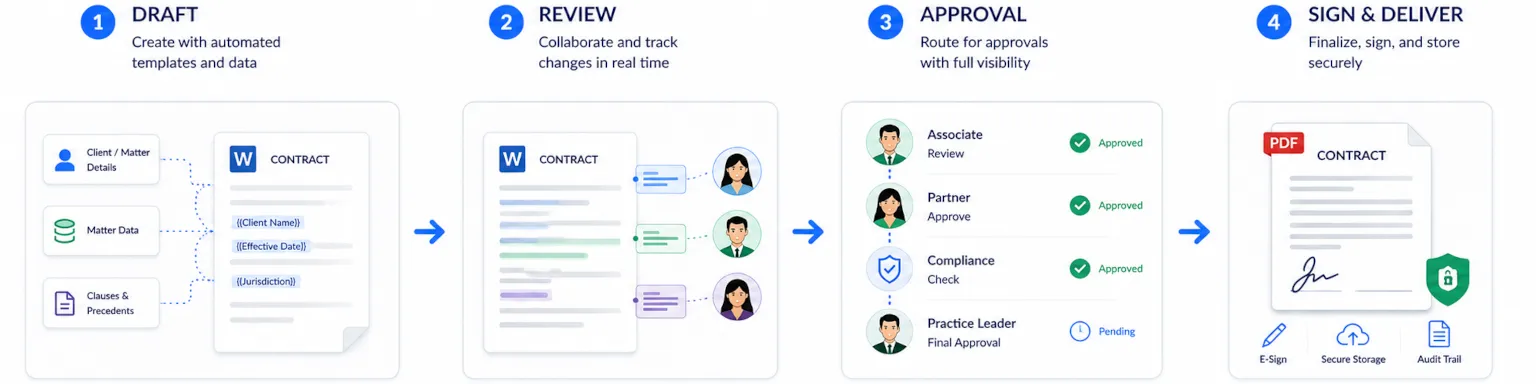
Automation enables collaboration among multiple users, reducing manual work and errors throughout the process. Legal document automation software can generate client and case documents in minutes, not hours, contributing to smoother, more satisfying experiences for everyone involved.
A single workflow can move a contract from initial draft through multiple review stages to e-signature without manual intervention at each step.
Seamless integration with e-signature platforms like DocuSign and document management systems creates a unified ecosystem. This orchestration eliminates the tracking burden that accompanies complex processes—no more email chains asking “where is this document?”
These workflow elements build upon template-based generation to create end-to-end automation solutions that touch every phase of document processes.
Benefits of Automation
Increased Efficiency
Implementing document automation delivers a host of benefits that transform how law firms and other organizations handle their document workflows. By leveraging legal document automation software and automated workflows, firms can dramatically increase efficiency, allowing teams to process documents in a fraction of the time required by manual methods.
This not only accelerates the document creation process but also reduces the risk of human error, ensuring more accurate documents and minimizing costly mistakes.

Error Reduction
Automated workflows eliminate the need for repetitive manual intervention, freeing legal professionals from time-consuming tasks and enabling them to focus on higher-value work. Automation follows predefined rules, which ensures consistency and reduces the risk of costly errors and compliance issues.
Enhanced Productivity
This shift not only boosts productivity but also enhances job satisfaction, as staff spend less time on routine document processes and more on strategic, client-focused activities. For law firms managing complex business processes, automation ensures that even intricate documents are generated consistently and in compliance with firm standards.
Scalable Growth
Moreover, document automation software streamlines the entire process—from drafting to approval—resulting in faster turnaround times and improved client service. By reducing manual touchpoints, firms can handle larger volumes of documents without increasing headcount, supporting scalable growth and a more agile business model.
Ultimately, automation empowers organizations to deliver better results with fewer resources, making it a cornerstone of modern legal operations.
Document Management in Automated Workflows
Standardized Document Creation
Effective document management is at the heart of successful automated document workflows. Automated workflows standardize how documents are created, stored, and accessed, ensuring that every document follows a consistent process from inception to completion.
By utilizing document templates that can be automatically populated with relevant data, organizations minimize manual data entry and reduce the likelihood of errors.
Access Controls and Versioning
Automated document workflows also provide robust controls over document access and versioning. With built-in access controls, only authorized personnel can view or edit sensitive documents, maintaining confidentiality and compliance with industry regulations.
Audit trails track every action taken on a document, from creation to final approval, providing a transparent record for regulatory compliance and internal governance.
Collaboration and Security
Maintaining control over documents is further enhanced by automated version control, which ensures that teams are always working with the most up-to-date information. This reduces confusion and prevents outdated or incorrect documents from being circulated.
By integrating these document management features into automated workflows, organizations can safeguard their data, streamline collaboration, and ensure that every document meets the highest standards of accuracy and security.
Implementation Approaches for Law Firm Automation
Effective document automation solutions for law firms combine dedicated automation platforms and features within practice management suites to reduce manual work and improve accuracy. Choosing the right implementation approach is crucial for aligning technology with your firm's unique needs and goals.
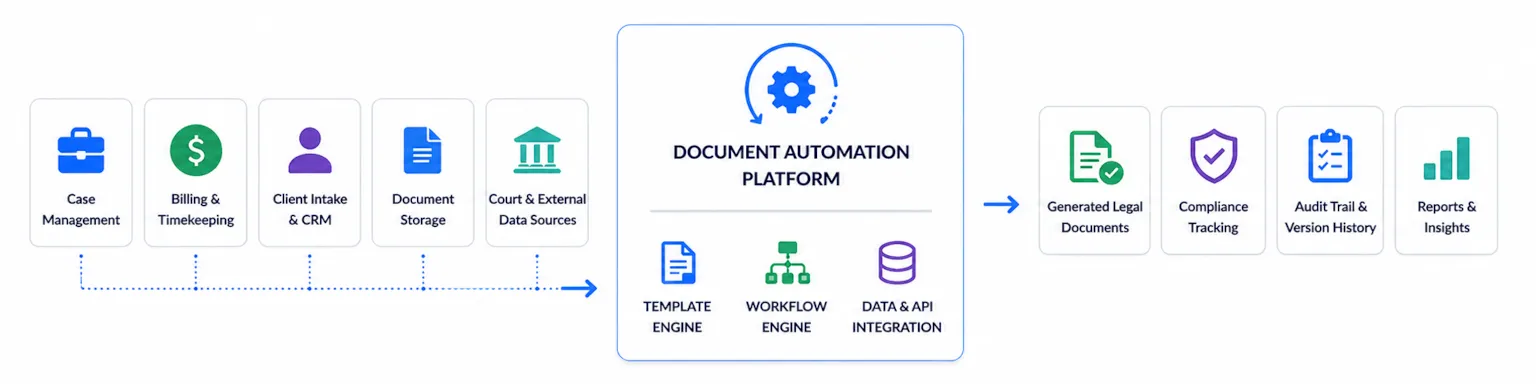
With foundational concepts established, law firms face practical decisions about how to implement document automation technology. Three primary approaches exist, each with distinct advantages for different firm profiles.
Cloud-Based Automation Platforms
SaaS solutions offer pre-built templates and workflow engines designed specifically for legal work. Document automation tools help law firms save time by streamlining document workflows, automating repetitive tasks, and ensuring quick access to the most recent information. Platforms like Clio, PandaDoc, and Rally provide immediate access to legal document automation software without significant infrastructure investment.
Clio Draft automates court form population with existing client data for all 50 states, and integrates seamlessly with Clio's practice management software. Clio Draft also syncs directly with Clio Manage, converting Word files into reusable templates and providing jurisdiction-specific court forms.
These platforms excel at integration capabilities, connecting with popular practice management software through standard APIs. For firms using common systems, implementation can happen in weeks rather than months.
Security and scalability merit careful evaluation. Leading platforms maintain SOC 2 compliance and encrypt document data both in transit and at rest, addressing the heightened security requirements of legal work.
Custom Development Solutions
Some practice areas require tailored automation workflows that off-the-shelf tools cannot accommodate. Complex business processes in areas like M&A, structured finance, or specialized litigation often demand custom development.
When considering custom document automation solutions, key features to look for include integration capabilities, automation triggers, customizable templates, document routing, robust security, usability, and responsive support.
MOST Programming builds custom document automation solutions that integrate with specialized legal databases, court systems, and proprietary firm processes. These solutions provide maximum flexibility but require longer implementation timelines and dedicated development expertise.
For large or high-volume legal teams, HotDocs is an enterprise-level solution offering advanced conditional logic and customization for complex documents. HotDocs uses a proprietary markup language to handle complex nested decision trees and conditional clauses, making it ideal for high-volume environments. Actionstep is a highly adaptable platform that triggers document assembly based on specific case milestones, ensuring workflow consistency. Spellbook is an AI-powered tool that integrates with Microsoft Word to generate clauses and review contracts for legal risks.
Custom approaches suit firms where document workflows represent core competitive differentiation or where existing systems require deep API integrations unavailable in commercial platforms.
Hybrid Integration Models
Many firms achieve optimal results by combining off-the-shelf automation tools with custom development components. A firm might use commercial document automation software for standard contracts while building custom integrations to collect data from specialized practice management systems.
This hybrid model balances implementation speed against customization requirements. It enables the creation of personalized documents by leveraging webhook data and automation tools, and supports collaboration among multiple users by streamlining workflows and reducing errors.
Legal document automation is extremely flexible and customizable to meet the unique needs of different legal practices, jurisdictions, clients, and individual lawyers. Data aggregation from multiple sources becomes possible without rebuilding proven commercial platforms.
The right approach depends on firm size, practice complexity, budget, and internal technical capabilities. The following section details implementation procedures applicable across approaches.
Step-by-Step Implementation Process
Successful implementation requires structured methodology that accounts for both technical and organizational factors. Understanding your business process and identifying areas of manual work are crucial first steps to ensure automation addresses the right pain points.
Additionally, monitoring and optimizing workflows with analytics helps identify inefficiencies and improve processes over time. These key steps apply whether adopting commercial platforms or building custom automation solutions.
Assessment and Planning Methodology
Before selecting technology, thorough assessment prevents costly missteps:
- Audit current document creation processes by cataloging every document type produced, time consumed, and error frequency. This baseline data supports ROI projections and prioritization.
- Map existing data sources across practice management, billing, client intake, and document management systems. Understanding where document data currently resides determines integration requirements.
- Evaluate opportunities to standardize processes by identifying where standardized templates, naming conventions, and procedural checklists can be implemented. Standardized templates help avoid copy-paste mistakes, outdated clauses, and inconsistent formatting that can delay progress or weaken client confidence.
- Define automation priorities based on document volume and complexity. High-volume, standardized templates like NDAs and engagement letters often deliver fastest returns. Complex workflows require more sophisticated solutions.
- Identify key features needed in automation solutions such as integration capabilities, automation triggers, templates, document routing, security, usability, and support to ensure the chosen platform meets your firm's requirements.
- Establish success metrics including time savings targets, error reduction goals, and client satisfaction improvements. These metrics guide technology selection and measure implementation success.
Technology Selection Comparison
Table: SaaS Platform vs. Custom Solution
| Criterion | SaaS Platform | Custom Solution |
|---|---|---|
| Implementation Time | 2-4 weeks | 3-6 months |
| Customization Level | Limited to platform capabilities | Fully tailored to firm requirements |
| Integration Complexity | Standard APIs with common systems | Custom APIs for specialized systems |
| Long-term Cost | Monthly subscription scaling with users | One-time development plus maintenance |
| Coding Required | No | Yes (handled by development partner) |
| Intuitive Interface | Often features a user-friendly, intuitive interface for easy workflow management | Interface design depends on developer; may require training |
When selecting law firm document automation workflow solutions, it's important to evaluate document automation tools based on their usability, such as an intuitive interface, and their integration capabilities with existing systems. An intuitive interface simplifies building and managing workflows, making document automation tools accessible even for non-technical users.
Smaller firms with standard document needs typically find commercial platforms sufficient. Larger firms or those with specialized practices often require custom development to maintain control over complex workflows and ensure consistency across unique practice requirements.
MOST Programming offers consultation to help firms evaluate which approach aligns with their specific situation, providing objective assessment before recommending solutions.
Common Challenges and Solutions
Implementation rarely proceeds without obstacles. Many challenges stem from manual work and inefficient business processes, which can slow down operations and increase the risk of errors. Understanding typical challenges enables proactive mitigation.
Data Integration Complexity
Law firms often maintain multiple systems that don’t communicate natively—separate platforms for case management, billing, document storage, and client intake create data silos.
Solution: Implement API-first architecture and comprehensive data mapping strategies. Integration platforms like Zapier or Make connect disparate systems when native integrations don’t exist. For complex scenarios, custom integration development creates seamless connections between any systems.
User Adoption Resistance
Attorneys and staff accustomed to existing manual processes may resist new automation tools, particularly when learning curves seem steep.
Solution: Provide comprehensive training programs that demonstrate immediate time savings. Begin with pilot projects targeting high-volume document types where efficiency gains become obvious quickly. When staff see automated document workflows save hours on routine tasks, resistance typically converts to enthusiasm.
Compliance and Security Concerns
Legal work demands stringent access controls and comprehensive audit trails. Regulatory compliance requirements add complexity, particularly for firms handling sensitive matters.
Solution: Establish robust security protocols including role-based access controls, detailed audit trails, and encryption meeting legal industry standards. Select platforms with SOC 2 certification and ensure all document routing respects confidentiality requirements. Built-in analytics help monitor compliance status across the organization.
Template Standardization Issues
Inconsistent document templates across practice areas or attorneys create quality variations and maintenance headaches.
Solution: Develop centralized template libraries with version control and approval workflows. Designate template owners responsible for updates when laws or firm standards change. This governance structure ensures standardized templates remain current while preventing unauthorized modifications.
These solutions collectively transform implementation challenges into manageable process steps, leading to measurable benefits in greater efficiency and client satisfaction.
Industry Applications of Document Automation
Document automation solutions have become indispensable across a wide range of industries, each with unique document workflow requirements.
In law firms, document automation software streamlines the creation and management of legal documents such as contracts, agreements, and court filings, ensuring accuracy and compliance while reducing the burden of repetitive tasks. Automated workflows handle document routing for review and approval, allowing attorneys to focus on client service and complex legal analysis.
In healthcare, automated workflows manage sensitive patient records and administrative documents, supporting regulatory compliance and improving data accuracy. Financial institutions use document automation to generate invoices, receipts, and compliance reports, reducing manual data entry and expediting approval processes. The construction industry benefits from automation tools that manage project documentation, including building plans and permits, ensuring that all stakeholders have access to the latest information.
Across all these sectors, document automation solutions help organizations collect data efficiently, perform compliance checks with AI tools, and maintain rigorous audit trails. By automating document processes and reducing manual intervention, businesses can improve client satisfaction, ensure regulatory compliance, and allocate resources to higher-value activities. Whether managing legal documents, financial records, or project files, automated workflows provide the flexibility and control needed to thrive in today’s fast-paced business environment.
Next Steps for Law Firm Document Automation
Conclusion and Next Steps
Law firm document automation workflow solutions deliver substantial efficiency gains while strengthening competitive edge in an increasingly technology-driven legal market. By automating repetitive tasks, firms reduce human error, accelerate document creation, and free legal professionals to focus on strategic work that clients value most.
The path from manual processes to intelligent document automation requires systematic implementation but yields returns that compound over time. Every automated document workflow reduces cost, improves accuracy, and increases capacity for growth.
Immediate actionable steps:
- Conduct a document process audit cataloging current workflows, time consumption, and error patterns.
- Identify 5-10 high-volume document types suitable for initial automation.
- Evaluate integration requirements with existing systems.
- Pilot automation with one practice area before firm-wide rollout.
- Measure results against pre-implementation baselines.
Related topics worth exploring include legal analytics platforms for decision making insights, AI-powered contract review for automated compliance checks, case management system optimization, and custom legal software development for unique practice requirements.
FAQs Related To Law Firm Custom Software Development
What is law firm custom software development?
Law firm custom software development is the process of creating tailored technology solutions specifically designed to meet the unique operational needs of a legal practice. Unlike off-the-shelf software, custom solutions are built from the ground up to address your firm's specific workflows, document management requirements, and client communication needs. This approach ensures that the software integrates seamlessly with your existing systems and scales as your practice grows, which is a core principle of our Cloud Application Development Services.
How does legal custom software differ from commercial legal software?
Legal custom software differs from commercial legal software in that it is purpose-built for your firm's specific requirements rather than designed for a broad market. While commercial software offers general features that may or may not fit your workflow, custom software is designed around how your firm actually operates. This means you get exactly the features you need without paying for unnecessary functionality, and the system can evolve as your practice changes over time.
What are the benefits of investing in law firm custom software development?
Investing in law firm custom software development provides numerous benefits, including increased efficiency through automation of repetitive tasks, improved accuracy by reducing manual data entry, and enhanced client satisfaction through faster turnaround times. Custom software also offers better integration with your existing systems, creating a unified technology ecosystem. Additionally, it provides a competitive advantage by enabling workflows that competitors using generic software cannot replicate.
What types of legal custom software can be developed for law firms?
Legal custom software can encompass a wide range of applications, including document automation systems, case management platforms, client intake and onboarding portals, time tracking and billing solutions, and secure client communication systems. Many firms also benefit from custom dashboards that provide real-time insights into firm performance, similar to our Data Visualization services. The key is that each solution is tailored to address specific pain points within your practice.
How long does law firm custom software development typically take?
The timeline for law firm custom software development varies depending on the complexity and scope of the project. A simple document automation tool might take a few weeks to develop, while a comprehensive case management system could take several months. The process typically includes discovery and requirements gathering, design and prototyping, development and testing, and deployment and training. Working with an experienced development team helps ensure the project stays on schedule and within budget.
What is the process for developing legal custom software?
The process for developing legal custom software begins with a thorough assessment of your firm's needs and existing workflows. This is followed by designing a solution architecture that addresses your specific requirements. Development then proceeds in iterative phases, with regular feedback and testing to ensure the software meets expectations. This systematic approach is similar to our Data Flow Architecture methodology, ensuring that data flows efficiently through your custom system.
How can legal custom software improve document workflow automation?
Legal custom software can dramatically improve document workflow automation by creating intelligent systems that understand your firm's specific document types, approval processes, and compliance requirements. Custom automation can include features like automatic data population from your case management system, conditional logic that adapts documents based on case type, and integrated approval workflows that route documents to the right people at the right time. This level of customization is difficult to achieve with generic software.
What security considerations are important in law firm custom software development?
Security is paramount in law firm custom software development due to the sensitive nature of legal information. Important considerations include end-to-end encryption for data in transit and at rest, role-based access controls to ensure users only see information relevant to their role, regular security audits and penetration testing, and compliance with industry standards such as attorney-client privilege requirements. These security measures are integral to our Data Management and Optimization approach.
Can legal custom software integrate with existing practice management systems?
Yes, one of the primary advantages of legal custom software is its ability to integrate seamlessly with your existing practice management systems, accounting software, and other tools. Custom development allows for the creation of APIs and data connectors that ensure information flows smoothly between systems, eliminating data silos and reducing duplicate data entry. This integration capability is essential for creating an efficient, unified technology ecosystem within your firm.
How can a law firm get started with custom software development?
A law firm can get started with custom software development by first identifying the most significant operational challenges or bottlenecks in their current workflows. The next step is to consult with a software development firm that specializes in legal technology to discuss your needs and explore potential solutions. A good development partner will conduct a thorough discovery process, provide a detailed proposal with timeline and costs, and work collaboratively with your team throughout the development process to ensure the final product meets your expectations.
Additional Resources
Contact MOST Programming for custom legal automation consultation. Our team specializes in building tailored document automation solutions that integrate with specialized legal systems and address complex workflows commercial platforms cannot accommodate.
Useful tools for evaluation:
- Document automation ROI calculator to project cost savings
- Integration assessment template for mapping current systems
- Case studies of successful law firm automation implementations
For firms using popular legal practice management systems, integration guides specific to your platform can accelerate implementation planning and ensure seamless integration with existing infrastructure.