With the open and adaptable cloud computing platform provided by Microsoft Azure, you can innovate with a purpose, save money, and increase the productivity of your business.
Discover MoreMicrosoft Azure is a leading cloud computing platform that provides a wide range of services for hosting applications, websites, and data. With its global infrastructure, scalability, and integration with Microsoft products, Azure has become a popular choice for businesses of all sizes.

What is Azure?
Azure is a cloud computing platform offered by Microsoft, providing over 200 services, including computing power, storage, databases, machine learning, analytics, and more. Azure enables organizations to host applications and websites without the need for physical servers, offering flexibility, scalability, and cost-efficiency.
Key Features of Azure as a Hosting Platform
Global Infrastructure: Azure operates in multiple regions and availability zones worldwide, ensuring low latency and high availability for hosted applications.
Scalability: Azure allows users to scale resources up or down based on demand, ensuring optimal performance and cost-efficiency.
Pay-As-You-Go Pricing: Users pay only for the resources they use, making Azure a cost-effective solution for hosting.
Security: Azure provides robust security features, including encryption, identity and access management (IAM), and compliance with industry standards.
Flexibility: Azure supports a wide range of operating systems, programming languages, and frameworks, enabling users to host virtually any application.
Integration: Azure integrates seamlessly with other Azure services and third-party tools, enabling end-to-end solutions.
Reliability: Azure offers a Service Level Agreement (SLA) with 99.9% uptime, ensuring high availability for hosted applications.
Core Azure Services for Hosting
Azure provides a variety of services for hosting applications and websites. Here are some of the most popular ones:
1. Azure Virtual Machines (VMs)
Provides scalable virtual servers for hosting applications.
Supports a wide range of operating systems, including Linux and Windows.
Offers VM types optimized for different workloads, such as compute-optimized, memory-optimized, and GPU instances.
2. Azure App Service
A platform-as-a-service (PaaS) that simplifies application deployment and management.
Supports multiple programming languages, including .NET, Java, Node.js, Python, and PHP.
Ideal for hosting web applications, APIs, and mobile app backends.
3. Azure Kubernetes Service (AKS)
A managed Kubernetes service for deploying and managing containerized applications.
Provides automatic scaling, monitoring, and updates for Kubernetes clusters.
4. Azure SQL Database
A managed relational database service that supports SQL Server.
Handles database administration tasks, such as backups, patching, and scaling.
5. Azure Blob Storage
A scalable object storage service for storing and retrieving data.
Ideal for hosting static websites, storing backups, and serving media files.
6. Azure CDN (Content Delivery Network)
A global CDN that distributes content with low latency.
Ideal for hosting websites and applications with a global audience.
7. Azure Functions
A serverless computing service that runs code in response to events.
Ideal for hosting microservices and event-driven applications.
8. Azure Static Web Apps
A fully managed service for hosting static websites and single-page applications (SPAs).
Integrates with GitHub for continuous deployment.
Benefits of Using Azure for Hosting
Cost-Effective: Azure’s pay-as-you-go pricing model helps organizations save costs by paying only for the resources they use.
Scalability: Azure allows users to scale resources up or down based on demand, ensuring optimal performance and cost-efficiency.
Global Reach: Azure’s global infrastructure ensures low latency and high availability for hosted applications.
Security: Azure provides enterprise-grade security features, including encryption, IAM, and compliance with industry standards.
Flexibility: Azure supports a wide range of operating systems, programming languages, and frameworks, enabling users to host virtually any application.
Reliability: Azure offers a Service Level Agreement (SLA) with 99.9% uptime, ensuring high availability for hosted applications.
Integration: Azure integrates seamlessly with other Azure services and third-party tools, enabling end-to-end solutions.
Common Use Cases for Azure Hosting
Web Application Hosting: Azure is ideal for hosting web applications, from small websites to large-scale enterprise applications.
E-Commerce Platforms: Azure provides the scalability and reliability needed for hosting e-commerce platforms, ensuring a seamless shopping experience for customers.
Mobile App Backends: Azure services like Azure Functions and Azure App Service are ideal for hosting backends for mobile applications.
Data-Intensive Applications: Azure provides the storage and computing power needed for hosting data-intensive applications, such as big data analytics and machine learning.
Content Delivery: Azure CDN ensures fast and reliable content delivery for websites and applications with a global audience.
Development and Testing Environments: Azure provides scalable and cost-effective environments for development and testing.
Getting Started with Azure Hosting
To start hosting on Azure, follow these steps:
Create an Azure Account: Sign up for an Azure account at azure.microsoft.com.
Choose a Hosting Service: Select the Azure service that best meets your hosting needs, such as Azure Virtual Machines, Azure App Service, or Azure Static Web Apps.
Configure Resources: Set up virtual servers, storage, databases, and other resources as needed.
Deploy Your Application: Upload your application code and configure it to run on Azure.
Monitor and Scale: Use Azure tools like Azure Monitor to monitor performance and scale resources as needed.
Conclusion
Azure is a powerful and flexible hosting platform that enables organizations to host applications and websites with ease. Its global infrastructure, scalability, and pay-as-you-go pricing model make it an excellent choice for businesses of all sizes. Whether you’re hosting a small website or a large-scale enterprise application, Azure provides the tools and services you need to succeed.
By leveraging Azure’s capabilities, organizations can achieve high performance, reliability, and cost-efficiency for their hosted applications.
Microsoft Azure Services: The Complete Guide to Cloud Computing Platform for Business Intelligence
Introduction
Microsoft Azure is a comprehensive cloud computing platform that delivers Infrastructure as a Service (IaaS), Platform as a Service (PaaS), and Software as a Service (SaaS) capabilities through a unified azure portal. As the cloud services offering from Microsoft, the azure platform enables organizations to build, deploy, and manage applications across global data centers while leveraging advanced data analytics and machine learning capabilities.
This guide covers Azure’s core azure services, business applications, and integration with business intelligence solutions. The content targets IT professionals, business analysts, and decision-makers evaluating cloud migration and data modernization strategies—whether you’re assessing azure fundamentals for the first time or planning enterprise-scale implementations.
After reading this guide, you will understand:
- Azure service categories and their business applications
- Implementation approaches for data analytics workloads
- Cost optimization strategies using azure resource manager
- Power BI integration with azure data services
- Migration planning for legacy systems and on-premises infrastructure
Understanding Cloud Computing with Microsoft Azure
Cloud computing fundamentals center on delivering on-demand computing resources over the internet, eliminating the need for organizations to maintain physical infrastructure. Azure delivers this through virtualization technology—a hypervisor abstraction layer that enables virtual machines to run on physical hardware managed by Microsoft across global data centers.
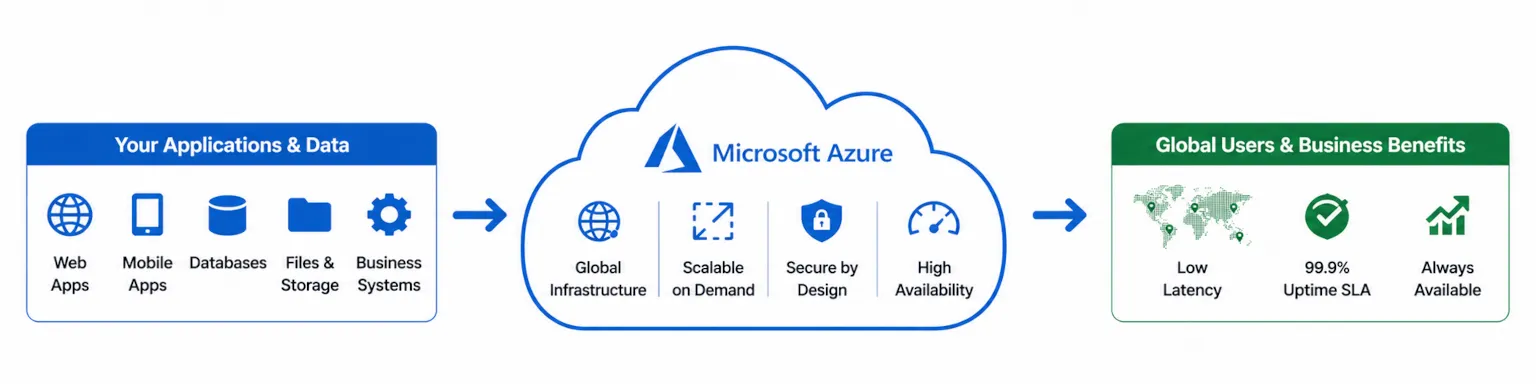
Azure’s global infrastructure spans 300+ data centers across 70+ regions, ensuring high availability, disaster recovery capabilities, and compliance with regional data residency requirements. This distributed architecture includes 3x data replication, meaning all customer data stored in azure cloud environments is copied three times for redundancy and business continuity.
Infrastructure as a Service (IaaS)
IaaS provides organizations with azure virtual machines, storage, and virtual networks without managing underlying physical hardware. Azure Virtual Machines support multiple programming languages and operating systems, including cross platform linux distribution options alongside Windows environments.
This model connects directly to business scenarios requiring scalable compute resources and legacy system modernization. Organizations running sql server workloads on-premises can migrate to azure virtual machines while maintaining familiar configurations, or transition to fully managed azure sql options for reduced operational overhead.
Platform as a Service (PaaS)
PaaS offerings abstract infrastructure management further, allowing developers to focus on application code rather than server maintenance. Azure App Service hosts web apps and mobile apps with automatic scaling and patch management. Azure also enables developers to send push notifications across various platforms from a single backend, providing real-time alerts and updates to users. Azure Spring Apps provides fully managed service capabilities for Java applications, while azure functions enables serverless computing where code executes without dedicated server provisioning.
These services accelerate custom software development and rapid application deployment. Development teams gain continuous deployment support and devops tool integrations through azure devops, streamlining the path from code commit to production release.
Software as a Service (SaaS)
SaaS applications like Microsoft 365, Dynamics 365, and Power BI provide complete solutions accessible through subscription models. These multiple microsoft services integrate seamlessly with azure platform infrastructure, enabling unified identity management through azure ad and centralized access management across applications.
This integration creates the foundation for exploring specific azure service categories and their applications in data-driven business transformation.
Core Azure Service Categories
Azure organizes its 600+ services by function and business use case, creating a coherent portfolio for data-driven transformation. Understanding these categories helps organizations identify which azure resources address specific requirements for analytics modernization and cloud intelligence initiatives.
Compute Services and Azure Virtual Machines
Azure compute services span multiple deployment models based on workload requirements:
- Azure Virtual Machines provide full control over operating systems and configurations for lift-and-shift migrations
- Azure Kubernetes Service orchestrates azure container workloads at massive scale with integrated monitoring
- Azure Container Instances offer the fastest path to running azure container workloads without cluster management
- Azure Functions execute event-driven code with automatic scaling and pay-per-execution pricing
- Azure Service Fabric supports microservices architecture and container orchestration for distributed applications
Scalability, performance, and cost optimization drive service selection. Batch processing workloads benefit from azure virtual machines with reserved capacity, while variable traffic patterns favor azure functions and serverless approaches.
Analytics and Data Services
Azure’s analytics portfolio addresses the complete data lifecycle from ingestion through visualization:
- Azure Synapse Analytics unifies big data analytics and enterprise data warehousing in a single service
- Azure Data Factory orchestrates ETL/ELT processes with 90+ native connectors for data management
- Azure Databricks provides collaborative analytics on Apache Spark for data engineering and data science
- Azure Machine Learning enables model development, training, and deployment for predictive analytics
- Azure Maps integrates location data and mapping visuals into business applications, enhancing operational insights and user experience
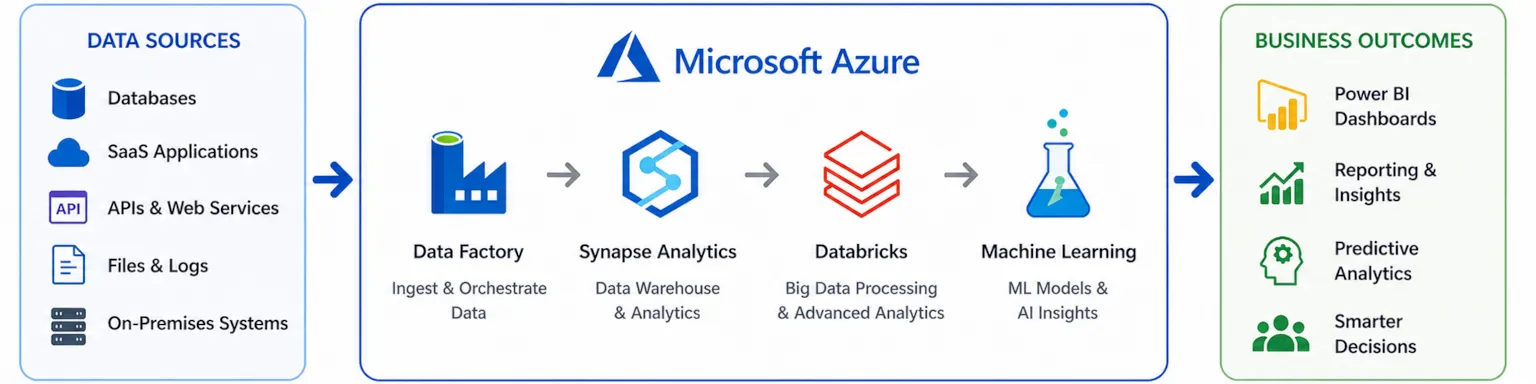
These services integrate directly with Power BI for business intelligence workflows, creating end-to-end pipelines from raw unstructured data sources to executive dashboards.
AI and Machine Learning
Azure AI services provide both pre-built and customizable capabilities:
- Azure OpenAI offers GPT-4 and other foundation models with enterprise security and compliance
- Azure AI Studio centralizes model development, fine-tuning, and deployment workflows
- Cognitive Services deliver pre-built ai services for vision, speech, language, and decision-making
These tools connect to predictive analytics and process automation use cases. Organizations implement machine learning models that analyze customer data patterns, forecast demand, or automate document processing—all within azure’s security and compliance framework.
Storage and Database Solutions with Azure SQL
Azure storage and database for postgresql, sql database, and other services address diverse data persistence requirements:
- Blob Storage handles unstructured data including documents, images, and backup archives with locally redundant storage options
- Azure SQL Database provides fully managed relational database capabilities with automatic tuning
- Azure Cosmos DB delivers globally distributed NoSQL with single-digit millisecond response times
- Azure Container Storage enables persistent volumes for containerized workloads
- Data Lake Storage supports analytics-ready storage for massive scale data aggregation
These services focus on data aggregation from multiple sources, multi-source integration, and creating analytics-ready foundations for business intelligence initiatives.
Azure Development and Deployment Tools
Azure Development and Deployment Tools are fundamental for organizations looking to accelerate their journey on the Azure platform. These tools empower development teams to build, test, and deploy applications efficiently, leveraging the full spectrum of Azure services for scalability, security, and reliability. With solutions like Azure DevOps, Azure Pipelines, and Azure Resource Manager, businesses can implement continuous integration and continuous deployment (CI/CD) pipelines, automate infrastructure provisioning, and manage cloud resources as code.
Azure DevOps provides a unified environment for source control, agile planning, and release management, ensuring that teams can collaborate seamlessly across the entire application lifecycle. Azure Resource Manager enables infrastructure as code, allowing organizations to define, deploy, and manage Azure resources consistently and repeatably. By adopting these tools, businesses can reduce manual errors, speed up delivery cycles, and ensure that their cloud environments are both robust and compliant with organizational standards.
Whether you are deploying web apps, mobile apps, or complex data analytics solutions, Azure’s development and deployment tools streamline the process, making it easier to harness the power of the Azure platform for innovation and growth.
Azure DevOps for Business Intelligence Projects
Azure DevOps is a powerful suite of services designed to support the end-to-end development and deployment of business intelligence solutions on Azure. By integrating with key Azure services such as Azure SQL, Azure Cosmos DB, and Azure Machine Learning, Azure DevOps enables teams to automate the build, test, and deployment processes for data analytics and machine learning projects.
With Azure DevOps, teams can manage code repositories, track work items, and implement CI/CD pipelines that automatically deploy updates to Azure SQL databases, machine learning models, and data-driven applications. This integration ensures that business intelligence solutions are always up-to-date, reliable, and scalable. Azure DevOps also provides advanced monitoring and reporting tools, allowing teams to track the performance and quality of their BI deployments in real time.
By leveraging Azure DevOps, organizations can foster collaboration between data engineers, data scientists, and business analysts, streamline the delivery of analytics solutions, and accelerate the adoption of machine learning and data analytics across the enterprise.
Navigating the Azure Portal
The Azure Portal serves as the central hub for managing all aspects of your Azure environment. This intuitive, web-based interface allows users to create, configure, and monitor a wide range of Azure resources, from virtual machines and storage accounts to advanced Azure AI and Azure Database services.
Through the Azure Portal, users can easily deploy and manage virtual machines, set up and monitor Azure AI services, and configure Azure Database solutions such as Azure SQL and Azure Cosmos DB. The portal’s dashboard provides real-time insights into resource usage, performance, and health, making it simple to oversee complex cloud environments.
In addition to resource management, the Azure Portal offers direct access to documentation, tutorials, and support resources, helping users quickly resolve issues and learn best practices. Whether you are provisioning new resources, scaling existing services, or exploring the latest Azure innovations, the Azure Portal is your gateway to the full power of the Azure platform.
Azure IoT and Edge Computing for Business Intelligence
Azure IoT and Edge Computing services are transforming how businesses collect, process, and analyze data from connected devices. By integrating IoT and edge computing with business intelligence strategies, organizations can unlock real-time insights, optimize operations, and respond faster to changing market conditions.
Azure IoT Central and Azure IoT Hub provide scalable platforms for connecting, monitoring, and managing IoT devices across distributed environments. These services enable seamless data ingestion from sensors, machines, and mobile devices, feeding valuable information into analytics and machine learning pipelines on the Azure cloud.
With Azure’s edge computing capabilities, businesses can process data closer to the source, reducing latency and bandwidth usage while enhancing data privacy and security. This approach is particularly valuable for industries that require immediate decision-making, such as manufacturing, logistics, and healthcare.
Leveraging Azure IoT Edge
Azure IoT Edge is a fully managed service that brings cloud intelligence directly to edge devices, enabling organizations to run Azure services such as Azure Machine Learning, Azure Stream Analytics, and Azure Functions at the edge. By processing data locally, Azure IoT Edge reduces the need to transmit large volumes of data to the cloud, resulting in faster insights and more efficient operations.
This fully managed service supports a wide range of machine learning and analytics workloads, allowing businesses to deploy predictive models, automate processes, and monitor equipment health in real time. Azure IoT Edge also ensures secure device management and seamless integration with cloud-based analytics, making it easy to scale IoT solutions across thousands of devices.
By leveraging Azure IoT Edge, organizations can harness the power of cloud intelligence at the edge, drive innovation, and gain a competitive advantage through timely, data-driven decision-making.
Azure Implementation for Business Intelligence
Leveraging azure services for data analytics requires understanding modern data architecture patterns. Organizations typically establish data pipelines that move information from operational systems into analytical platforms, then connect visualization tools for decision-making.
Data Pipeline Development
Building effective data pipelines with azure data factory follows a structured approach:
- Connect data sources using Data Factory’s 90+ connectors for on-premises systems, SaaS applications, and legacy databases—including windows azure connect scenarios for hybrid environments
- Design transformation logic with mapping data flows for code-free transformations or integrate Azure Databricks for complex processing
- Configure orchestration with triggers for scheduled, event-driven, or tumbling window execution patterns
- Implement monitoring through azure portal dashboards and Azure Monitor alerts for pipeline health tracking
Quality assurance requires validation activities within pipelines that verify data completeness, format consistency, and business rule compliance before loading to analytical destinations.
Power BI Integration Strategies
| Integration Method | Use Case | Performance | Complexity |
|---|---|---|---|
| Direct Query | Real-time dashboards for azure iot central sensor data | Variable based on source | Low |
| Import Mode | Fast interactive reports with scheduled refresh | High with cached data | Medium |
| Composite Models | Hybrid scenarios combining imported and DirectQuery tables | Optimized for mixed workloads | High |
Selecting the optimal integration approach depends on data volume, refresh requirements, and user concurrency. Direct Query suits scenarios requiring current data from azure iot hub streams, while Import Mode serves interactive exploration of historical azure data. Composite Models balance real-time requirements with performance optimization.
Common Azure Implementation Challenges
Organizations adopting azure cloud services for data analytics encounter predictable obstacles. Addressing these proactively accelerates time-to-value and prevents costly rework.
Data Security and Compliance
Implement Azure Security Center for unified security management across azure resources, monitoring for threats and compliance violations. Azure Key Vault stores encryption keys, secrets, and certificates with hardware security module protection. Azure Information Protection classifies and protects sensitive data based on content, while distributed denial of service protection safeguards applications from network attacks.
Cost Management and Optimization
Establish Azure Cost Management practices with budget alerts, spending analysis, and azure pricing optimization recommendations. Reserved instances reduce compute costs by 40-60% for predictable workloads. Resource tagging enables cost allocation across departments and projects, while azure blueprints standardize deployments to prevent resource sprawl.
Performance Optimization
Configure Azure Monitor for infrastructure metrics and Application Insights for application-level telemetry. Load balancing distributes traffic across azure virtual machines for web apps handling variable demand. Performance tuning for data processing workloads often involves right-sizing azure container instances, optimizing azure database query patterns, and configuring appropriate caching layers.
Conclusion and Next Steps
Microsoft Azure provides azure customers with comprehensive cloud platform capabilities for business intelligence and data analytics transformation. From azure virtual machines for infrastructure modernization to azure ai services for intelligent automation, the platform addresses the complete spectrum of cloud computing requirements through 600+ services across global data centers.
Take these immediate steps to begin your Azure journey:
- Assess current data infrastructure using Azure Migrate to evaluate on-premises workloads
- Identify migration priorities based on business value, technical complexity, and dependency mapping
- Pilot azure services with sample datasets using Azure’s free tier offerings
- Establish governance frameworks with azure blueprints and access management policies
Related topics for continued learning include Azure certification paths (AZ-900 for azure fundamentals, DP-203 for data engineering), advanced analytics scenarios using azure machine learning, and hybrid cloud strategies for organizations maintaining azure iot edge devices and on-premises systems.
FAQs Related Azure Development Services
What are Azure Development Services?
Azure Development Services help businesses build scalable, secure Cloud Applications and infrastructure using Microsoft Azure. These services can include cloud architecture design, application development, API integration, cloud migration, automation, monitoring, and ongoing maintenance.
Why hire an Azure Development Services Company?
An Azure Development Services Company brings expertise in Azure’s broad ecosystem—including compute, storage, databases, networking, security, and serverless technologies—so you get well-architected solutions faster with fewer risks. Our Team ensures you handle everything efficiently rather than relying solely on internal resources.
What types of projects can an Azure Development Services Company build?
An Azure Development Services Company can build cloud-native applications, APIs, microservices, serverless workflows, containerized solutions, IoT platforms, data lakes, analytics pipelines, and secure enterprise systems that leverage Azure services like App Service, Functions, AKS, Cosmos DB, and more.
How does an Azure Development Services Company support cloud migration?
An Azure Development Services Company helps assess on-premises systems, plan migrations, re-architect applications when needed, and handle data transfer. We often utilize optimized Data Flow Architecture to minimize downtime and ensure a seamless move to Azure.
What are common use cases for Azure Development Services?
Common use cases include modernizing legacy applications, building scalable web and mobile backends, automating business processes, implementing disaster recovery and backup strategies, enabling AI and Machine Learning workloads, and creating hybrid or multi-cloud environments.
How does an Azure Development Services Company improve application performance?
An Azure Development Services Company optimizes performance by right-sizing compute resources, using autoscaling, implementing caching strategies, optimizing Data Management, and tuning application components to make the most of Azure’s global infrastructure.
Can an Azure Development Services Company handle security and compliance?
Yes. Security and compliance are core parts of Azure Development Services. A professional company configures identity and access management, key vaults, encryption, network security, logging and monitoring, and compliance controls, similar to the rigorous standards applied in our Security (Case Study).
Can Azure Development Services integrate with existing systems?
Absolutely. Azure Development Services Companies are experienced in integrating cloud platforms with on-premises systems, third-party APIs, CRM/ERP platforms, and messaging systems. We focus on Multi-Source Data Aggregation to enable seamless data flow and interoperability.
What’s the typical process when working with an Azure Development Services Company?
Work typically begins with discovery and architecture planning, followed by development and deployment, testing and validation, and ongoing support. A good Azure Development Services Company utilizes a modern Technology Stack to document the solution, set up monitoring, and provide maintenance plans.
How do you estimate the cost of Azure Development Services?
The cost of Azure Development Services depends on project complexity, Azure services required, integration needs, data volume, performance and security demands, and timeline. An Azure Development Services Company usually starts with discovery and scoping to provide a tailored estimate aligned with your business goals.
Related Pages at MOST
- About MOST Programming — Learn about our team, focus on data analytics, cloud solutions, and custom software expertise.
- Our Technology Stack — Full overview of tools including Azure, Power BI, SQL Server, PostgreSQL, and other cloud/data technologies we use.
- AI & Machine Learning Solutions — Building intelligent apps with Azure AI, Machine Learning, and related services.
- Data Management Solutions — Expertise in data pipelines, optimization, and Azure-integrated data handling.
- Data Flow Architecture — Designing efficient ETL, real-time processing, and Azure data workflows.
- Data Aggregation Solutions — Multi-source data unification and preparation for Azure analytics/BI.
- Cloud Data Applications — Developing interactive, scalable apps on Azure for business intelligence and data visualization.
- Contact Our Team — Get in touch for Azure consulting, migration support, BI implementation, or project discussions.
Additional Resources
- Azure Pricing Calculator estimates monthly costs based on service selection, regions, and usage patterns.
- Microsoft Learn provides free training paths for Azure data engineering, business intelligence, and related tools.
- Azure Architecture Center documents reference architectures, best practices, and design patterns for common scenarios.
- Microsoft Fabric resources for organizations implementing enterprise-scale data platforms (including OneLake and analytics integration).